Instellingen
 Snelle levering
 Gratis verzending
 Incoterms
 Betalingswijzen


 Marketplace-product


Connecting Pi to PC
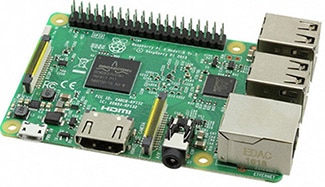
The Raspberry Pi is a very popular microcontroller. This is because it is basically a mini Linux computer. You can easily plug a monitor into its HDMI connector, a mouse and keyboard into USB connectors, and it is ready to go. The problem arises because that won’t always work. For some it would be easier to connect your Raspberry Pi to a laptop. The problem being that you cannot just connect the micro USB directly from the Pi to the laptop, open up your IDE, and program away. You have to go a slightly different route. The nice thing with the Raspberry Pi is that there are multiple options so that you can choose the one that works best for you.
You only need a couple items to get it working. Necessary items are: a Raspberry Pi, a power supply for it, computer, a connection to the internet, an FTDI USB-to-serial adapter, and the programs Putty and VNC viewer on your computer. This way you can connect to the Raspberry Pi via USB or an internet connection. You can also just have an SSH terminal or a whole virtual desktop.
You can watch the different methods in the following video. It is very easy to get access with these procedures. I would suggest starting with the USB method since SSH is not always enabled on the Raspberry Pi by default. You can easily enable it by going through the configuration menu using the command ‘sudo raspi-config’. The Raspberry Pi is very powerful and gives you a lot of options to work with.
Achtergrondinformatie over deze auteur

Sinds 2016 helpt Ben Roloff, geaggregeerde in toegepaste techniek bij DigiKey, klanten bij al hun microcontrollerbehoeften. Hij is geboren in 1991, een tijdperk toen internet in huis nog volslagen onbekend was. Langzaam begon internet zijn intrede te doen terwijl hij school liep. In zekere zin is Ben met het internet opgegroeid. Zijn interesse in computers zette hem ertoe aan om een opleiding computertechniek te volgen. Hij behaalde zijn wetenschappelijk bachelordiploma in computertechniek bij de South Dakota School of Mines and Technology.

Have questions or comments? Continue the conversation on TechForum, DigiKey's online community and technical resource.
Visit TechForum